Showing posts with label Downloads. Show all posts

July 24, 2015

How To Use Snapchat On PC

Snapchat, one of the most popular applications for sending images and videos can now be downloaded in your PC! Yes, you heard it right. Your favorite application Snapchat can also be accessed from your PC in case you want to use Snapchat on your PC instead of on your smartphone. In this article, we will give you a step by step procedure for downloading Snapchat on your system so that you can get done with the complete process without any issues. Let us start with discussing the key features that have made Snapchat a hotshot application and everyone’s favorite. 

How To Use Snapchat On PC

Things Which Make Snapchat Popular

  • The features which have made the first choice of users are:
  • Users can take and send pictures, videos, drawings, etc. to the desired number of recipients. 
  • The users can set a time limit (0 to 10 sec) for which the users can view the sent video or image.
  • The user interface of Snapchat is very simple and the users can understand it in a very short duration of time.

Steps To Download Snapchat For PC


Officially the PC version of Snapchat has not been released yet, so you will need to install Bluestacks installer on your system. Once the Bluestacks installation gets completed successfully, you can proceed with the next step.

Using Bluestacks
  • In the top left corner of Bluestacks application locate the search box.
  • In this search box type “Snapchat” and press Enter.
  • After a few seconds, Snapchat will start downloading and will get installed in Bluestacks.
  • After installation, go to Bluestacks and select the All Apps option.
  • In this click on the icon of Snapchat and start working with it.
  • In case the above method does not help you to install Snapchat on your PC, then you can try the below mentioned steps.
Using Android apk
  • Search for Snapchat.apk file on Google and once found, download it.
  • Double click on the Snapchat.apk file or open it manually with the help of Bluestacks by Right click >>Open With>>Bluestacks
  • The apk file will get installed within some time.
  • Now, go to Bluestacks and select the icon of Snapchat for using it on PC.
Conclusion

We believe that with the help of the above mentioned procedures, you can easily download Snapchat on your PC and start working with it.

Author: As an author of MS Outlook Tools, Peter has experience for more than 20 years in IT industry and he is now working with an expert data recovery firm. He has quality expertise in the Office products especially in Microsoft Outlook and love to solve users query by providing excellent solutions. You can follow him on Facebook, Google plus,  Twitter and LinkedIn.

May 12, 2015

Skype Translator Now Available For Download

The real-time Skype Translator has been in a testing stage for a few months now, the idea powering this translation service is to remove language barriers and allow it to be easier for individuals to connect with family and friends.This new feature can translate languages like English, Italian, Spanish and Mandarin while you talk to the other person on Skype both on the video clip or voice contact. Even though it’s nonetheless within the preview state, Microsoft these days eliminated the sign-up requirement and is now allowing anyone to take Skype Translator to get a spin.

skype translation service

Starting these days anyone can obtain the Skype Translator preview app in the Windows Shop on a Windows machine or a Computer or tablet that is operating a preview build of Windows 10. Since there’s not a sign-up requirement the application may be instantly used after downloading from the windows store.

Aside from assistance for the above mentioned 4 spoken languages, Skype Translation service also has support for 50 instant messaging languages. Users can create text in their language and the recipient will receive it in their language.

The end objective with Skype Translation service is to provide more than three hundred million linked Skype customers the ability to connect normally with people even when they don’t share a typical language, you need to confess, it is pretty helpful. You can download the Skype Translator Preview from Here.

November 1, 2014

How to Resume a Failed Chrome Download from Right Where it Failed

Chrome Downloader might be trustworthy, but when it comes to failed download you can’t do anything but to start from beginning. It is good if you are downloading small files as they are not much of a pain to start from the beginning but large files can be quite frustrating. This is why people tend to go for other download manager which can resume the failed download from where you left off. But the problem is, these download managers try to make you install tons of other things while installation and not to mention all the malware and other security threats which arise with these managers use. We are here to help you with this matter with some simple steps you can now resume chrome download right where it failed! But you will need to have Firefox installed in order to do this.

The best part is, it will not only resume failed downloads, but also the one that failed as you closed chrome or PC hanged or anything. All failed and canceled downloads will easily be resumed by following these simple steps.


resume chrome download Go to Chrome Downloads

Go to Chrome downloads folder from menu or by pressing Ctrl+J and there find the failed download file which you like to resume. Open the folder where it was being downloaded and see its name, it should be a file with CRDOWNLOAD extension. For this tutorial we will call it This_File.crdownload. While you are in chrome download folder also copy the link of the failed download.

resume chrome download Start the Download in Firefox
Now go to Firefox and paste link there to download. As the download Right-Click on the download progress and choose the pause option to pause the download.

Look for Firefox paused Download
Go to the location where Firefox was downloading the file and see its name, it might be saving with some other name in contrast to chrome. Let’s say it is saving with name This File.part, just copy the name of the file, therefore ‘This File’.

resume chrome download

Rename the Failed Download
Now rename the failed download which you located in 1st step with the copied name and change the extension name from CRDOWNLOAD to PART. Therefore, change name from This_File.crdownload to This File.part. The windows will prompt that this can lead to corrupt file but don’t worry just do it.

Replace Firefox file
Now copy the renamed file and go to the location where the Firefox download file is located. Delete that file and copy the renamed file there.

Resume Download
Now go to Firefox and resume the download which you paused before. Firefox will resume the download from where chrome failed to download.

What actually happens?
When Chrome fails to download something, it doesn’t actually delete the file. Whatever is downloaded remains there in the download folder, but chrome cannot resume it at it doesn’t support this feature. On the other hand, Firefox can easily do that if proper file name and extension is provided. When you replace the file name with the one in Firefox it will start resuming the same file which chrome couldn’t resume.

April 13, 2014

Games Are The Most Downloaded Application On App Stores

What do you like to download from app stores when you are free and you want to kill your time with good entertainment. Majority of the people choose 'Games' to be their best time killer buddy. Games are the highly downloaded product on iTunes, Google Play Store and Amazon app store. Games accounts for 41 percent downloads on Google Play Store and iTunes , Whereas on Amazon it seems like , majority of the people only head towards the site to download games which accounts almost 61 percent. If there would be no games,on app stores, The next thing which users love is entertainment like Music, Movies, TV Shows or etc. On Amazon app Store and Apple App store, the entertainment apps are on second as compared to Games, which accounts for 10 percent on Amazon app store and 8 percent on Apple Play Store. Users on Google Play Store likes communication apps more , rather than entertainment apps which accounts for 8 percent of communication apps and 6 percent of entertainment apps. Below is the Statista chart , that shows top category downloads on 3 of the major online app stores in the world.

Games Are The Most Downloaded Application On App Stores

March 23, 2014

New Tax Law In UK Will Increase iTunes And App Store Prices By 20 Percent

Apple iTunes customers in UK might be see a little increased price in app purchase and digital goods by next year when the new Tax Law is UK will take effect. Currently the digital download retailers like iTunes and Amazon in UK avoid the 20% VAT by selling from other countries like Luxembourg where the VAT is  3% - 15%. UK government will now close the tax loophole resulting in 20% higher price in purchases from iTunes or any other online retailer avoiding 20% value added tax. The news was first reported by The guardian where George Osborne -the Chancellor of the Exchequer and Second Lord of the Treasury of the United Kingdom will be applying the new laws by 2015. He would use this year's finance bill to impose the new law from 1 January 2015.

iTunes music download will see 20 percent increased price after new Tax law in uk


The budget document said:

"As announced at budget 2013, the government will legislate to change the rules for the taxation of intra-EU business to consumer supplies of telecommunications, broadcasting and e-services. From 1 January 2015 these services will be taxed in the member state in which the consumer is located, ensuring these are taxed fairly and helping to protect revenue."

Still they have an year to apply the law, so things might change, however with 20% VAT UK-based online digital companies will be facing disadvantage. iTunes customers can buy cheap music and digital goods from USA ,same goes for Amazon. According to the supporters of the new law, it will bring more fair competition among foreign and domestic companies.

November 26, 2013

Google Play Edition Of HTC One And Samsung Galaxy S4 Got Android 4.4 KitKat Software Update

Andorid 4.4 KitKat – the latest operating system for andorid devices has now been pushed to Google Play Editions of Samsung Galaxy S4 and HTC One. People using Galaxy S4 and HTC One can now upgrade thier operating system to the latest Andorid 4.4 KitKat. These smartphones are the next after Moto X to get Andorid 4.4 KitKat. Android 4.4 KitKat’s new features include a new launcher, a new dialer that incorporates search, Hangouts with consolidated text, video and MMS, new HDR+ software for cameras and deep app linking for Google search. But one thing which HTC one , Samsung Galaxy S4 and Moto X will not be getting is Google Experience Launcher which is only available on Nexus 5,unveiled at the end of October. Google Experience launcher was exclusive on Nexus 5 which allows you to swipe left for Google Now ,Trigger Google Search through an “OK Google” hot keyword and new features to optimize the look of your operating system. Other features besides Google Experience Launcher will be available on Galaxy S4 and HTC One. So Galaxy S4 and HTC One users get ready to experience Android KitKat 4.4 on your smartphones.

Android Kitkat 4.4 now availble on google play versions of Galaxy S4 and HTC one

November 21, 2013

Photoshop Photography Program Now Available For Every One At $10 Monthly Subscription

Today , Adobe has announced a great news for its valuable users, Back in September, Adobe announced a Photoshop Photography Program to CS3 users and higher which allows a full fledged Creative cloud member ship for only $10 per month. This subscription was only valid to CS3 users only but now , adobe has taken off the limits and the program is now available for everyone for a limited period of time. Any user can now subscribe in the Photoshop Photography Program for $10 per month which allow users a full access to Photoshop CC, Lightroom 5 , 20 GB of cloud storage for file sharing and collaboration , a Behance ProSite membership and various updates and upgrades. This offer is valid till December 2 2013 , so if you want to avail this offer you have to sign up for a one-year plan by December 2. Upon expiration, the Photoshop Photography Program will continue to be available for $10 per month to owners of previous versions of Photoshop Extended, or Creative Suite, version CS3 or later (CS3.x, CS4, CS5.x, or CS6). So guys hurry up to avail this interesting offer. You can sign up for this offer from here.

Photoshop Photography Program available for every one at $10 per month

July 5, 2013

AT&T Locker -Cloud Based Storage Arrives On Windows Phone 8

You might be familiar with the AT&T Locker, a cloud storage service for AT&T users in the US which allows them to keep all their important data saved on the cloud. It provides a space of 5Gb which is enough to store pictures ,contacts and important notes which normally a phone stores. This service has now arrived on Windows Phone 8 which will keep your data saved now. Windows Phone 8 users can now upload pictures,documents,videos and music files on AT&T locker through Wi-Fi connection or AT&T service internet. Windows Phone 8 users can simply go to locker.att.net and sign up for the account. Just fill out your email , AT&T Access ID , Password and mobile number. After submitting , once you receive the confirmation email, you are all set . Just download the application on Windows phone 8 and enjoy the service.

AT&T Locker arrives on Windows Phone 8

April 4, 2013

Facebook Finally Revealed Its New Home On Android

Many of you might have missed the event but we are here to give you all the updates of the Facebook event held in Menlo Park,Calif.  The “Facebook Phone” has finally arrived but its not actually a phone but a new creative way of integrating Facebook on Android devices that its looks like Facebook Phone. Its rethinking of how Facebook appears on Android Devices. Mark Zuckerberg actually showed how we can turn our phone into a Facebook Phone . You will be interacting with people first rather than applications in this new Facebook Home.

facebook Home April 12th

Mark Zuckerberg said , “We want to bring the experience of having a home, of having everything you need right around you… to your phone.”.

This new update will feature full screen photos, status updates and notifications piped into your home screen for a better interaction .The Home screen feature is basically to make your feeds more focused with a constant updates of feeds and photos. Now you don't have to drag your screen down to update your feed. It will have a new notification system that lets you scrub through multiple alerts at once. Now you can manage your conversation through “Chatheads”, which works with Facebook Messenger and SMS.

The HTC First – The First Phone To Have Facebook Home Pre-installed

Facebook has created the Facebook Home Program to allow a handset makers to optimize the Home experience. Partners include AT&T, Orange, Qualcomm, HTC, Samsung, Huawei, Sony, EE, ZTE, Lenovo, and Alcatel. The first phone to have the Facebook Home on it will be HTC First which will come pre-installed with the new update on April 12th for $99.9.

HTC First debut on April 12 for $99

HTC CEO Peter Chou said , HTC first will be an ultimate social phone with AT&T LTE network (2 year contract) .  It will be available in four different with 4.3 inch display, 1GB of RAM and a Qualcomm Snapdragon MSM8960 chipset. Lets wait till April 12th , but the pre-order have started today.

Facebook Home Will Be Available  On April 12th In The Play Store

The Facebook Home will be available officially on April 12th in the Play Store , so if you don't get the update on your Android device you can download from the Play Store. This download will only be compatible for the Smartphone's but not the Tablets. The tablets version will come in several months so Tablet users have to wait a little more. Company said ,

“Releasing Facebook Home in the Play Store is key element in Facebook's strategy”

Facebook New Home available on April 12th 
Users will be able to use this feature either as application or as an Android Launcher , it depends upon you how you like to experience. At first the update will only be available to selected Android phones which includes The HTC One, HTC One X, Samsung Galaxy SIII, Samsung Galaxy S4 and Samsung Galaxy Note II, the other rest will have to wait to let Facebook work with hardware partners to make it compatible with other devices as well.

When the feature will launch so you will experience a banner alert on your most recent Facebook App to download the Home from Google Play. So just download and after launching you can decide whether you want to “try once” or “always” to swap in Home for you. The company plans to update the Home app every month , so this will be a new Facebook experience.

Lets wait for April 12th !!

March 11, 2013

Twitter Expand Its Archive Downloading Program To 12 More languages

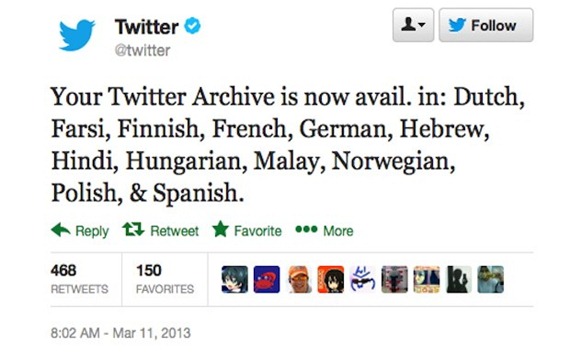
Twitter archive is the best way to keep a record of your past tweets. If you want to go back in the time and retrieve what you have tweeted , just download your twitter archive. The days back when Twitter started its archive downloading program in December 2012 , it was only available in English. Today , the company has expanded the ground and added 12 more languages to its Twitter archive downloading program. As you can see from the image below , the twitter archive will now be available in Spanish, Polish, Norwegian, Malay, Hungarian, Hindi, Hebrew, German, French, Finnish, Farsi and Dutch. Now the archive will be available in 13 different languages. To download your Twitter archive just go to your Settings and look for “Request Your Archive” . Once requested you will receive a link to download a ZIP file of your tweet archive in your mail.

Twitter archive downloading expanded to 12 more languages